Open Next Dash and read the order
To start a job, pull out your smartphone by pressing T on your keyboard or clicking the [T] Open button displayed on your screen. From the phone home screen, click Next Dash, then select the "dash now" button to open the dispatch board.
The app presents a list of available jobs on individual cards. In the runs we watched, an order card details everything you need to assess profitability:
- Job tier: Classifications like STANDARD show the baseline order type.
- Cash payout: Specific amounts such as $176 appear in clear text on the card face.
- Total route distance: Displays how far the final drop-off is, such as 900 ft.
- Pickup distance: Indicates how far the restaurant or depot sits from your current location, such as pickup 500 ft away.
Reading these details before accepting allows you to avoid low-paying orders that demand excessive travel. For a full comparison of delivery rewards against stunt pay, see our Money guide.
Ride the pickup, then the drop-off
Once you click accept on an order card, your GPS automatically activates on the roadway. A bright yellow line paints your route directly across the pavement.
- Follow the yellow line along the street toward the pickup location.
- Stop inside the designated marker circle and press E to collect the parcel.
- Turn back toward the roadway, where the yellow line recalculates to point toward the customer address.
- Ride to the customer location and park inside the drop-off zone.
As soon as your bike registers inside the drop zone, the delivery finishes, your cash balance updates, and an XP notification appears. Obeying traffic signals along the route prevents police cruisers from starting a pursuit that cuts into your payout. If you are starting fresh and need a broader roadmap, check our guide on How to get money fast.
What the orders pay
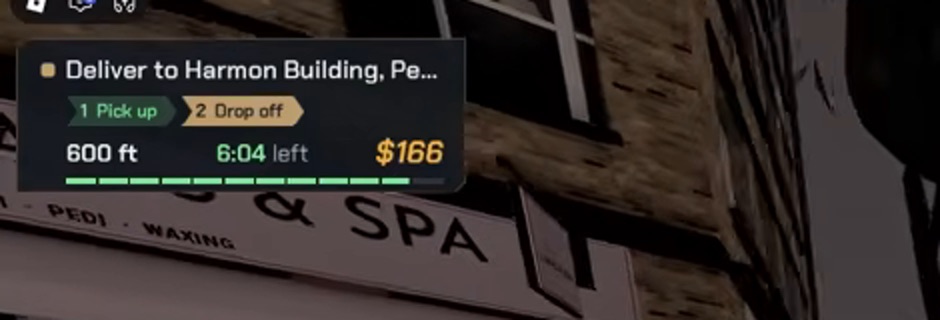
The order card sits top left while you ride: destination, pickup and drop-off count, distance, time left and the payout in the corner. The bar under the payout drains with the timer. Frame from the beginner guide recording at 1:58.
Order payouts change from card to card on the Next Dash board. In the gameplay recordings we examined, individual delivery completions rewarded $166, $176, $194, $250, and about $400.
The game does not publish an official mathematical table explaining exact pay formulas, but recorded deliveries show that payouts vary based on distance and order classification. Even on shorter routes paying $166 to $176, Next Dash delivers far more cash per minute than freestyle stunt riding. To test how quickly your regular deliveries add up toward vehicle purchases, enter your times into our Cash rate calculator.
Chain orders without downtime
Next Dash has no cooldown timer between contracts. When a delivery completes and the customer payout lands in your wallet, you do not need to return to your garage or wait for a board refresh.
You can press T right at the customer curb, open Next Dash, hit "dash now", and select another order on the spot. Because the next pickup might be just down the block, staying on the road creates a seamless earning rhythm. Keep your bike charged or fueled so you can chain several orders in a single sitting without stopping.